Display terminal
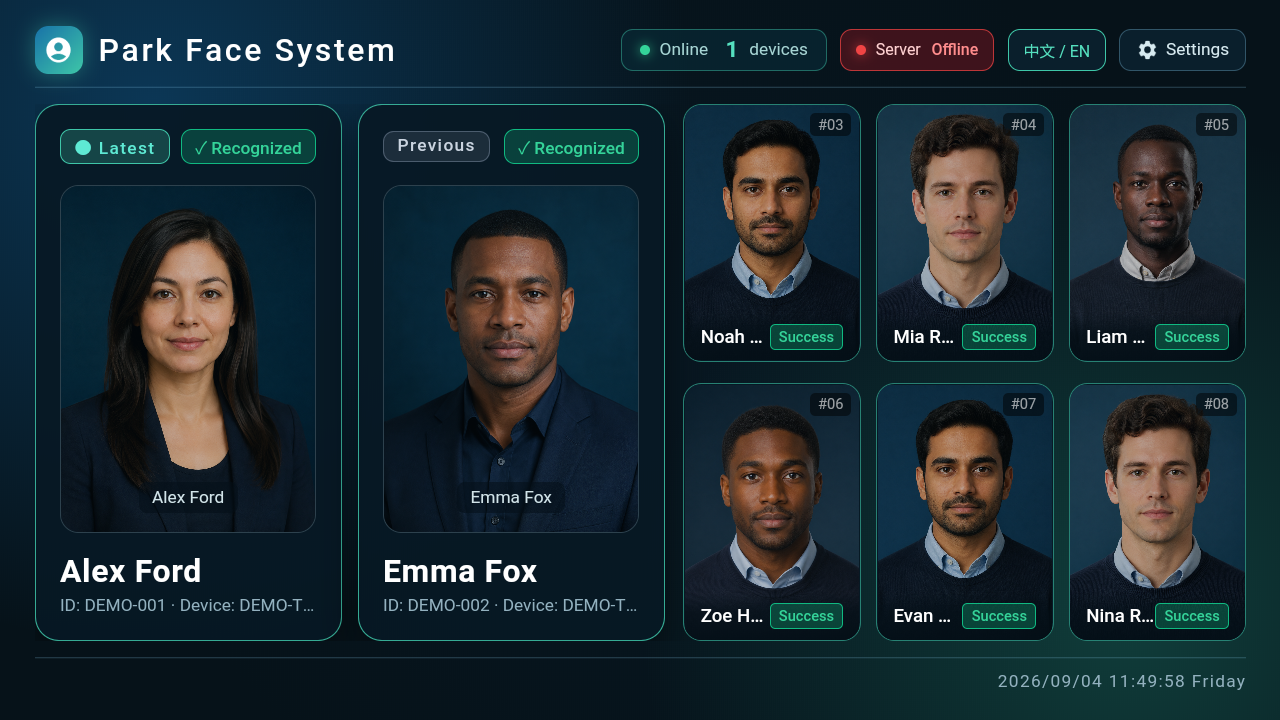
The display terminal turns device recognition events into continuously visible cards for staff rooms and on-site screens. Staff can review the latest recognition, recent events, online device count, and central service connection together.
External recognition devices perform the face comparison. The display receives and presents results and stores the captures it receives locally. Person profiles are maintained through the service platform and enrollment terminal.
Choose the correct mode
Before first use, confirm the actual event destination with your deployment team, then select the mode.
| Mode | How events reach the display | What to confirm |
|---|---|---|
| Local | Recognition devices upload directly to the display's local endpoint | The device can reach the display, and protocol and device information are configured |
| Cloud | The central service or a compatible callback uploads to the display | The callback destination is configured and can reach the cloud receiving endpoint |
Cloud mode describes how events are received; it does not require the public internet. A reachable central address does not establish that the callback from the center to the display is configured.
Connect and verify
- Start the display application and open settings from the top bar.
- Choose Local or Cloud and enter the central service base address, including protocol and any required port.
- Save, return to the display, and check the central service status. Complete the connection check if the address is missing or probing is unfinished.
- Configure the device upload address or ask the administrator to configure the central callback, according to the selected mode.
- Have a synchronized test person complete recognition. Verify that this new event appears with the correct name, person identifier, device, and time.
Check the result: A real event from the current test enters the latest card. A connected-center indicator or already populated cards alone do not verify the recognition path.
Read recognition cards
The two large cards on the left show the latest and previous results. Six smaller cards on the right retain earlier recent events. A new event moves older results backward, with up to eight visible events.
| Information | How to use it |
|---|---|
| Name and person identifier | Match the event to the person being tested or reviewed |
| Device and time | Identify where and when the event occurred |
| Recognition result | Distinguish successful recognition, strangers, and other exceptional results |
| Capture photo | Check the event subject; a placeholder may appear when a photo is unavailable |
On a cold start, the application reads its eight most recent local records. When real records are absent, the page supplies demonstration placeholders. For acceptance, use an event generated after startup that matches the test person and time.
Understand online status
| Displayed state | Meaning | What to check |
|---|---|---|
| Central service connected | The display can reach the central heartbeat endpoint | Continue with callback and recognition verification |
| Central service unavailable | Address, network, or service response is failing | Base address, port, and central service |
| Online device count is 0 | The current system has no valid online devices | Local mode: local device heartbeats; Cloud mode: central device statistics |
Online count is -- | No valid statistic has been obtained yet | Wait for the check and verify the central connection; do not equate this with zero |
| Cards do not update | No new event has reached the active receiving path | Mode, upload destination, and event records |
In Local mode, the online count comes from the display's own device records. In Cloud mode, it comes from central service device statistics. It differs from the node count on the Web System Configuration page.
Local management page
Authorized maintainers can access the built-in management page using the supplied management address and separate administration token. It provides health information, local device management, recent captures, person synchronization tasks, and runtime mode settings.
Before adding a device, prepare its SID, protocol, address, port, and required authentication information. Verify heartbeats first, then one real recognition event. Compatibility also depends on the specific protocol version; see recognition devices.
The management page also includes log, recognition-record, and capture-photo cleanup. Confirm retention requirements and back up required data before clearing records. Do not clear records as a way to investigate a display that is not updating.
Maintenance reference: default ports
Defaults are HTTP 8180 for local devices, HTTP 8181 for local management, HTTP 8011 for cloud reception, and UDP 20785 for node discovery. Use the deployed configuration as the authority and restrict management access to the authorized maintenance network.